
|
|
General HydroStatics
Ship Stability Software |
|
Command of the Week
(New or interesting aspects of GHS that you may not know about) |
|
DB EditLSwt combining
|
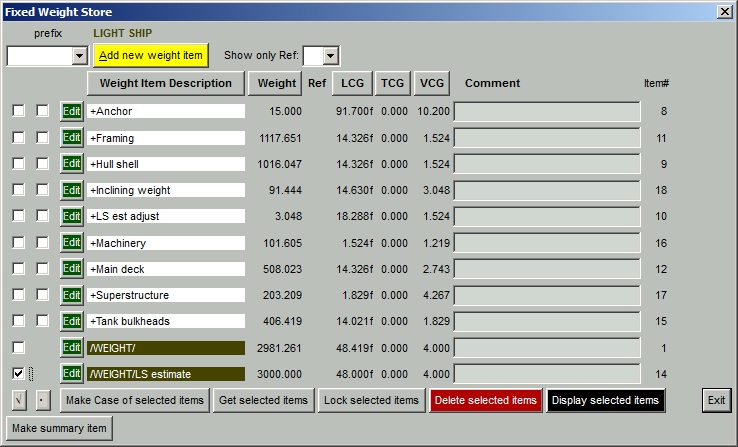
| It is not immediately apparent why there are two columns of check boxes in the DB EditLSwt dialog. |
|
|
The outer column is the typical selector for determining which items get included
in the functions shown at the bottom of the dialog.
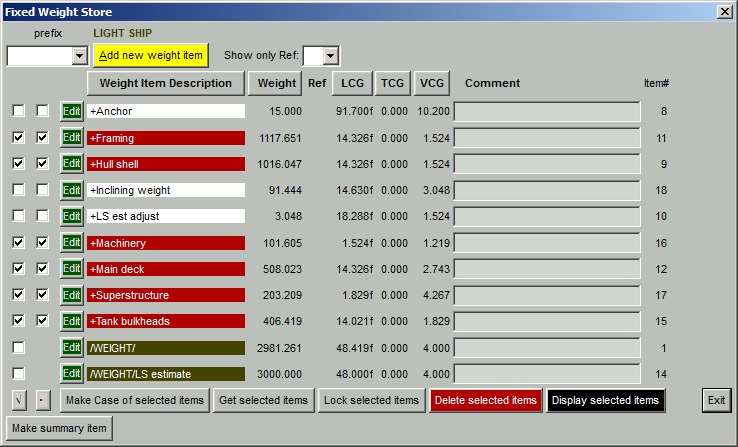
The inner column marks a selection of items to be emitted as the equivalent of a single WEIGHT command, preserving weight distributions, if any. This is a unique feature found only in DB EditLSWt. The command WEIGHT * does something similar, combining all added weights, except those whose descriptions begin with "*" or "+", into the WEIGHT item, but it does not preserve weight distributions. So EditLSWt is unique in that it allows you to select the weight items you want to be merged into WEIGHT, keeping their distributions, and without deleting them as separate items in the data base. Now since the items that have been combined into WEIGHT still exist in the data base, there is a danger that the same items might inadvertently be used separately as well, causing a double accounting of those weight items. To guard against this, the item descriptions take on a red background color once they have been gotten into the WEIGHT. |
|
|
Why might you want to do this?
The program is designed such that the weight and CG represented by the WEIGHT item
should include all or nearly all of the light ship, which allows for adjustment indirectly from
the draft. For example, SOLVE WEIGHT sets the magnitude of the WEIGHT item.
So although items named with leading "+" are considered to be part of light ship, they are not touched
by SOLVE WEIGHT. Therefore, if your data base contains named weight items that are considered
major contributors to light ship, you may want to have them combined in WEIGHT.
The red background remains as a reminder that those items have been acounted for. To return the background to normal, first click the "." button at the bottom of the column, then uncheck the inner column for each item. Those who have not read this COW probably do not know this. |
|
Questions, comments, or requests?
Contact Creative Systems, Inc. USA phone: 360-385-6212 Fax: 360-385-6213 Office hours: 7:00 am - 4:00 pm Pacific Time, Monday - Friday Mailing address: PO Box 1910 Port Townsend, WA 98368 USA Click here for an index to this and previous COWs |