
|
|
General HydroStatics
Ship Stability Software |
|
Command of the Week
(New or interesting aspects of GHS that you may not know about) |
|
db.ProcGetExpand
(Requires GHS version 17.00 or later) |
|
(Use the command DB Update to get the latest version
of the Data Base software.)
This is another "expand" macro provided by the Data Base. It is entirely unnecessary if you use the high-level dialogs like CalcPlan and the DB Executive wizard. But some users are never happy until they build their own interfaces. We already are familiar with DB Procs which allows you to define and edit Procedures. Also we know that DB ExeProc "procname" executes the given procedure or by default allows you to pick a procedure and execute it. But how does one pick a procedure and capture its name so it can be executed repeatedly without picking it again or remembering it some other way? That's what db.ProcGetExpand does for you, and here is a minimal example: |
|
template t expand db.ProcGetExpand "procname" / |
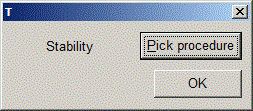
| Here is what the template's rendered dialog looks like after someone has selected their "Stability" procedure: |
|
|
The procedure name you pick shows up in the dialog and also
in the variable you specified, in this case "procname".
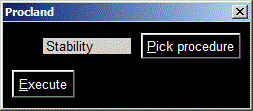
So now you can make this template useful by adding a button to execute the procedure you have selected. Then wrap it in a macro, and you have a nice little DB tool of your own making. |
|
macro Procland template t "Procland" /bg:0 expand db.ProcGetExpand "procname" break "Execute" .t1 exit // macro t1 DB ExeProc "{procname}" // variable (str) procname DB Start .t / .Procland |
|
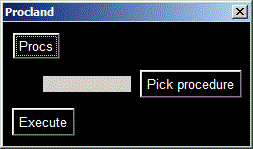
| Of course you wouldn't stop there. You would want to include a button to create and edit procedures, which makes it a veritable interface from which you can do anything a procedure can do, which is everything. |
|
macro Procland template t "Procland" /bg:0 /nokey "Procs" .t2 break expand db.ProcGetExpand "procname" break "Execute" .t1 exit // macro t1 DB ExeProc "{procname}" // macro t2 DB Procs // variable (str) procname DB Start .t / .Procland |
|
|
"Well, that's nice," someone says. "But I want the Procs list to show all the time
for editing, etc."
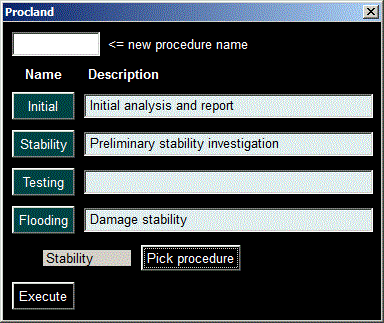
In the same dialog? "Yes, in the same dialog." Okay, we have something for that too. Try this: |
|
macro Procland template t "Procland" /bg:0 /nokey expand db.ProcsExpand break expand db.ProcGetExpand "procname" break "Execute" .t1 exit // macro t1 DB ExeProc "{procname}" // macro t2 DB Procs // variable (str) procname DB Start .t / .Procland |
|
|
"That looks confusing to me," says someone else. "It doesn't clearly show the
relationship of the Procs list to the buttons below it. Could we show one at a time?"
In the same dialog? "Yes, in the same dialog." Here's a little trick you can use to turn the expand lines in your template on and off. Since a repetition factor is available, you can put a number in parentheses after the expand name. Furthermore if it's a variable, you can switch its value between zero and one. |
|
macro Procland template t "Procland" /bg:0 /nokey "{hide}Procs" /bg:14 .t4 /persist:refresh expand db.ProcsExpand (i) break line expand db.ProcGetExpand (j) "procname" break expand t3 (j) exit // macro t1 DB ExeProc "{procname}" // macro t2 DB Procs // macro t3 "Execute" /bg:14 .t1 // macro t4 j:=i i:=1-i if i<>0 then hide:="Hide " else hide:="" // variable (str) procname, hide variable i=0, j=1 DB Start .t / .Procland |
|
(The alternate expression syntax which requires GHS version 17.36 or later
is used in this example.)
Initially it looks like this: |
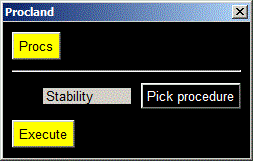
|
| Click the Procs button and you get this: |
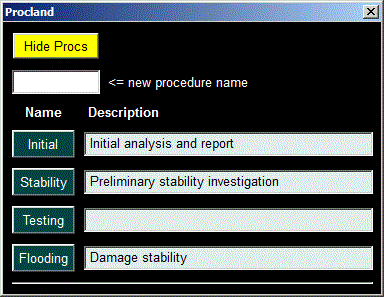
|
|
"How is that any different from the first one?" says the first guy, "-- the one where you simply used a button for DB Procs?"
There isn't any difference, really. Unless someone looks at your code and sees how clever you were. That's the essential difference, and it must be worth something! |
|
Questions, comments, or requests?
Contact Creative Systems, Inc. USA phone: 360-385-6212 Fax: 360-385-6213 Office hours: 7:00 am - 4:00 pm Pacific Time, Monday - Friday Mailing address: PO Box 1910 Port Townsend, WA 98368 USA Click here for an index to this and previous COWs |