
|
|
General HydroStatics
Ship Stability Software |
|
Command of the Week
(New or interesting aspects of GHS that you may not know about) |
|
db.CalcPlanExpand
(Requires GHS version 17.00 or later and Load Editor (LEW)) |
|
(Use the command DB Update to get the latest version
of the Data Base software.)
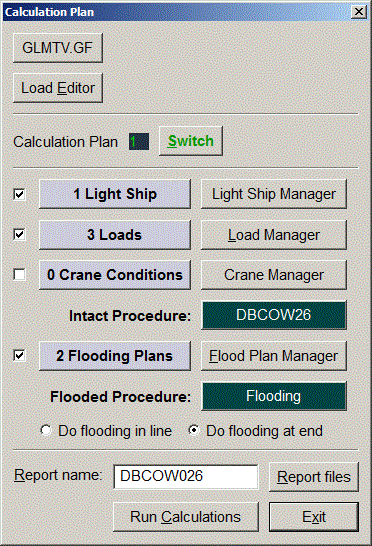
db.CalcPlanExpand is for embedding the CalcPlan dialog in your own template. Notice that it is not a DB command. For example, you might want a dialog that includes the CalcPlan dialog and also a couple of additional buttons. Here's a macro that does it: |
|
macro CalcPlan macro m1 set GFname=FILENAME "{GF}" db CalcPlan PREP exit t // macro m2 db %%91 exit m1 // template t "Calculation Plan" "{GFname}_" exit m2 "GetGF" break "Load _Editor" exit m2 "LoadEdit 2" break line expand db.CalcPlanExpand // variable (str) GFname exit m1 / .CalcPlan |
| Now your command .CalcPlan brings up the composite dialog: |
|
|
The top button displays the current Geometry File name
as well as being the means of switching to a different GF.
Since it executes the DB GF command, you get to pick from the list
of the Geometry Files that you have put into the DB system.
The Load Editor button brings up the load editor configured with buttons for creating cases. Notice the special DB CalcPlan PREP command which prepares for the CalcPlan dialog. |
|
Questions, comments, or requests?
Contact Creative Systems, Inc. USA phone: 360-385-6212 Fax: 360-385-6213 Office hours: 7:00 am - 4:00 pm Pacific Time, Monday - Friday Mailing address: PO Box 1910 Port Townsend, WA 98368 USA Click here for an index to this and previous COWs |