
|
|
General HydroStatics
Ship Stability Software |
|
Command of the Week
(New or interesting aspects of GHS that you may not know about) |
|
Multihull Seakeeping (update)
(Requires GHS version 17.06A or later with SK) |
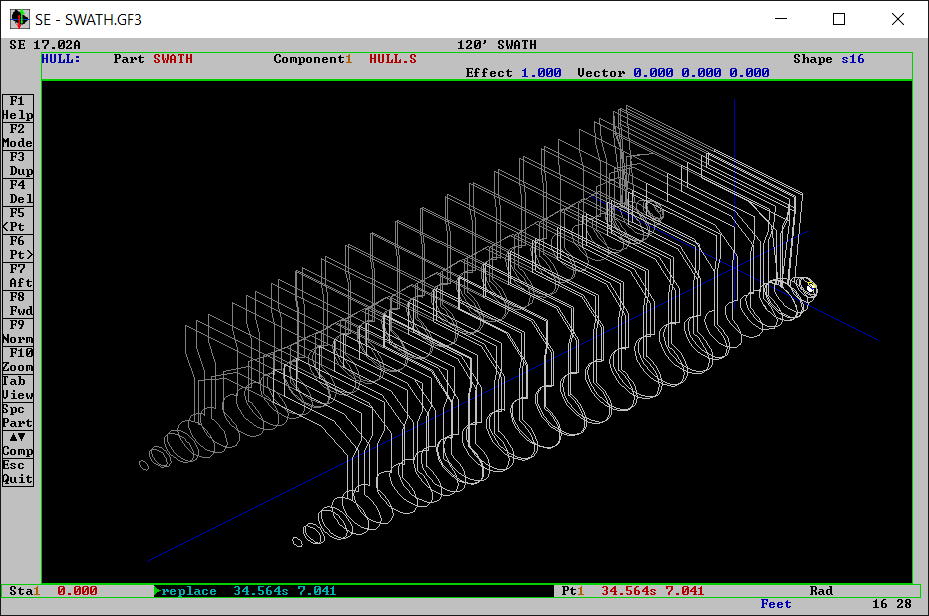
| Multihull seakeeping is something we seem to get asked about from time-to-time. The good news is that you can analyze a multihull vessel in GHS, but it takes some creative thinking and knowledge of the theory to ensure your results are acceptable. To illustrate, consider the following SWATH hull: |
|
|
In its native form, SEAKEEPING works on monohull vessels. So how do we make it run on a multihull? We'll make a SEAKEEPING call for each hull, and combine them. In this way, you could run SEAKEEPING on a trimaran, too, or maybe even a pentamaran... but let's not get too carried away.
First, we must ensure each hull is modeled as a separate component. In this example, we've modeled the SWATH with two components: HULL.P and HULL.S. We then pass each hull component to SEAKEEPING explicitly: |
|
read swath.gf
...establish loading condition wave (spe) p2 3.5 report temp.$$$ vari (str) skpars="/head:135 /samp:50,0.1,2.0 /bf:24" sea /hull:swath\hull.s {skpars} /data:stbd\hy,fo sea /hull:swath\hull.p {skpars} /data:port\hy,fo report off | erase temp.$$$ |
|
In this example, we are writing the hydrodynamic and forcing data for each hull to a respective "STBD" or "PORT" subdirectory. The next step requires some help from SK.LIB. The latest update to the SeaKeeping macro library includes two new macros: CombineHydroData and CombineForcingData. As their names suggest, these macros combine the hydrodynamic and forcing data from each hull into a single pair of data files. For more information on how these macros work, type .sk.libinfo after running SK.LIB. |
|
run sk.lib /call /quiet
MACRO SK-COMBINE `copy and then merge HYDROS and FORCING files copy "stbd\SK{CASE}-HYDROS.DAT" "SWATH{CASE}-HYDROS.DAT" .sk.combinehydrodata "SWATH{CASE}-HYDROS.DAT" "port\SK{CASE}-HYDROS.DAT" copy "stbd\SK{CASE}-FORCING.DAT" "SWATH{CASE}-FORCING.DAT" .sk.combineforcingdata "SWATH{CASE}-FORCING.DAT" "port\SK{CASE}-FORCING.DAT" / MACRO CombineAll SET CASE="001" | .SK-COMBINE SET CASE="002" | .SK-COMBINE / variable CASE .CombineAll report swath.pf sea data SWATH*-HYDROS.DAT /hyfo:SWATH*-FORCING.DAT report close /preview |
|
The final step in the process involves feeding the combined hydrodynamic and forcing data back into SEAKEEPING by use of the DATA mode, as shown above. This means SEAKEEPING will construct the equation of motion using the external data and return a complete report--just like a regular seakeeping run. However, there are two caveats to this approach: 1. because the forces on each hull are considered independently, any hydrodynamic interaction between the hulls is not considered. For a SWATH, this is generally a non-issue; for other multihulls, the interaction is decreased with forward speed. 2. because the combined multihull is run in SEAKEEPING DATA mode, slamming calculations can not be performed multihulls because /SLAM is not compatible with DATA mode. The geometry file and run file used to create this example may be found here. The latest SK.LIB may be found here. |
|
Questions, comments, or requests?
Contact Creative Systems, Inc. USA phone: 360-385-6212 Fax: 360-385-6213 Office hours: 7:00 am - 4:00 pm Pacific Time, Monday - Friday Mailing address: PO Box 1910 Port Townsend, WA 98368 USA Click here for an index to this and previous COWs |