
|
|
General HydroStatics
Ship Stability Software |
|
Command of the Week
(New or interesting aspects of GHS that you may not know about) |
|
LOAD /SEQ (review)
(Requires GHS version 16.40A or later with CG) |
|
Brave souls have oft ventured into HELP LOAD and (if they return) they are usually changed forever.
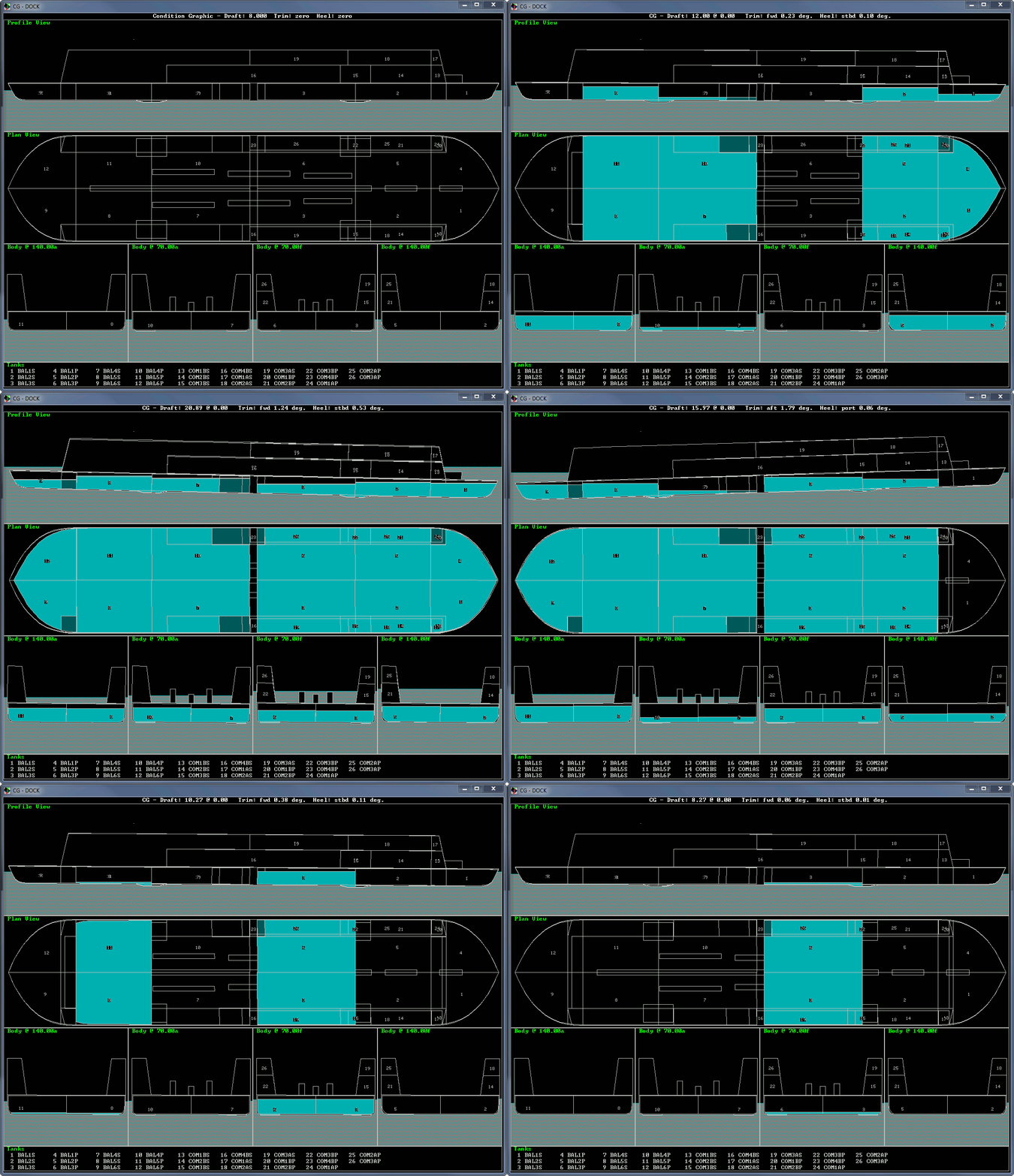
Most users are well-versed in loading a list of tank to a desired fraction, percentage, weight, volume or sounding. This is the standard use of the LOAD command, and you have likely used it to set up a multitude of operating load cases when evaluating intact stability. This is, of course, only scratching the surface when it comes to the capabilities that the LOAD command offers. One handy example is LOAD /SEQ. The SEQ stands for "sequence" and greatly reduces the number of commands needed to simulate sequential loading or unloading of tanks. Sure, you could accomplish this with a couple macro loops, some if-statements, and other programming trickery, but LOAD /SEQ simplifies things considerably. As an example, we wish to ballast down DOCK.GF. The dock has six P/S pairs of main ballast tanks. For simplicity, let us assume we have two ballast pumps that may be operated simultaneously. We can simulate the ballasting sequence as follows: |
|
macro down
load (BAL2*,BAL1*,BAL3*) VOL:*+%1 /SEQ:0.8 load (BAL5*,BAL4*,BAL6*) VOL:*+%2 /SEQ:0.8 solve wait %3 / macro up load (BAL6*,BAL2*,BAL1*) VOL:*-%1 /SEQ load (BAL3*,BAL5*,BAL4*) VOL:*-%2 /SEQ solve wait %3 / |
|
In the above example, the aft ballast tank pairs (4, 5, and 6) and the forward ballast tank pairs (1, 2, and 3) are sequentially loaded up to a maximum load of 0.8. A LOAD /SEQ command is issued for each of the two ballast pumps so that two tanks are always filling (or unfilling) simultaneously. The flow rate for each pump is controlled with the %1 or %2 parameter. When loading the tanks, LOAD /SEQ fills each tank in the tank list from left to right. Once the current tank is filled to 0.8, the next tank then begins filling, and so forth. When unloading, the sequence is performed in reverse order: from right to left. In the unloading macro, /SEQ is not given a value so it defaults to 0, although a "minimum" load could be specified. It is now very easy to loop through the loading and unloading process. |
|
.down(150) 1000 1000 0.1 wait 0.5 .up(168) 1000 1000 0.1 |
|
The result looks something like the following. Notice how the order of the tank list governs the order that tanks are filled. |
|
|
One can imagine the myriad of possibilities for LOAD /SEQ. Just think what else lurks in the vastness beyond.
The run file and geometry file used in this example may be found here. |
|
Questions, comments, or requests?
Contact Creative Systems, Inc. USA phone: 360-385-6212 Fax: 360-385-6213 Office hours: 7:00 am - 4:00 pm Pacific Time, Monday - Friday Mailing address: PO Box 1910 Port Townsend, WA 98368 USA Click here for an index to this and previous COWs |