
|
|
General HydroStatics
Ship Stability Software |
|
Command of the Week
(New or interesting aspects of GHS that you may not know about) |
|
EXPAND Macros
(Requires GHS ) |
|
For years, I've had a macro in my GHS.LF file which I use for quick reference to the color control numbers mentioned in Help Note. These colors are used by many commands; and after about the hundredth time consulting the help file to see which number corresponds to which color, it finally dawned on me to add this information to my load file.
Just yesterday, while searching for a good example EXPAND Macro for the next COW, I remembered that color macro. Using a very simple expand macro to show the colors in a TEMPLATE would make an eye-catching graphic. The template and expand macro looked something like this: |
|
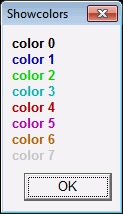
template ShowColors expand color (8,1) 0 / macro color "color %1_" /bold /color:%1 / .ShowColors |
| The EXECUTE ShowColors command yields my first attempt. Not very glamorous, eh? |
|
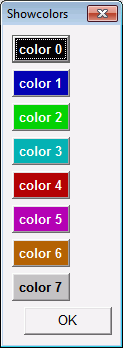
| Next, I tried putting colored buttons in the template instead of colored labels. Each button must be linked to a macro. Can you guess how those macros were made? That's right, another macro; see below. |
|
macro mkColorMac macro color%1 \color%1 // / .mkColorMac (16,1) 0 |
|
Here is the code for version two of the expand macro which produces the template shown. There was no need to change the template itself, just the expand macro. |
|
macro color "color %1_" .color%1 /bold /backcolor:%1 /vgap:3 / |
|
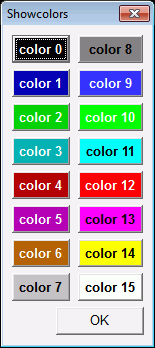
| There were 16 color macros but only 8 buttons in the template. The next evolution had two buttons on each line, matching the order of the colors in help. The in-line expression, {%1+8}, is used to offset the macro parameter by 8 so that each row shows the color corresponding to the current numeric parameter and that value plus 8. Template fields to appear on the same row must be separated by a pipe character, "|". When a pipe is found at the end of a line, the command is assumed to continue to the next line. Below is the updated expand macro and the resulting template. |
|
macro color "color %1_" .color%1 /bold /backcolor:%1 | "color {%1+8}_" .color{%1+8} /bold /backcolor:{%1+8} /vgap:3 / |
|
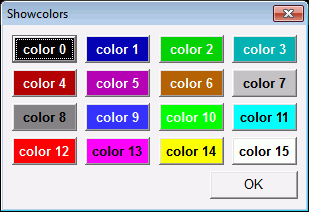
| This last example isn't for the faint of heart. It's not for those lacking in valor. It is reserved for those brimming with courage for it features an expand macro that calls ... another expand macro. This technique arranges the same 16 buttons as a transposed 4x4 grid. Check it out (if you dare): |
|
macro color2 "color %1_" .color%1 /bold /backcolor:%1 /vgap:3 %2 / macro color expand color2 (3,1) %1 "|" expand color2 {%1+3} / |
|
|
Have we gone too far this time? Send us an email if this COW is too off-color.
Seriously though, the two most common uses of expand macros are: 1. input tables where the user can change the number of rows, and 2. reducing repetition when multiple dialogs have the same subset of inputs. |
|
Questions, comments, or requests?
Contact Creative Systems, Inc. USA phone: 360-385-6212 Fax: 360-385-6213 Office hours: 7:00 am - 4:00 pm Pacific Time, Monday - Friday Mailing address: PO Box 1910 Port Townsend, WA 98368 USA Click here for an index to this and previous COWs |