
|
|
General HydroStatics
Ship Stability Software |
|
Command of the Week
(New or interesting aspects of GHS that you may not know about) |
|
SEAKEEPING DATA with different WAVEs
(Requires GHS with SK) |
|
The humble WAVE command actually has a lot packed into it. For example, it is used to set the monochromatic waves we often see in longitudinal strength calculations. But it is also the command that sets the wave conditions for a seakeeping analysis, most often as WAVE (SPE).
While the SEAKEEPING command will work with a WAVE (SIN) form, which is a simple sinusoid, typical usage involves a wave spectrum, using the (SPE) identifier on the WAVE command. A wave spectrum represents the short-term (i.e days, not years) energy distribution in the surface of the ocean due to waves. The spectrum, which looks deceptively like a probability distribution, shows how much energy is concentrated at each frequency in a seaway. And the wave spectrum is one of the most important input parameters in a seakeeping analysis, as it determines which frequencies will be excited and therefore has a major influence on the computed responses. The standard SEAKEEPING report includes a plot of the wave spectrum (and its discretization) at the beginning of each report if WAVE (SPE) is used to set up the analysis. For example, a spectrum plot in a report might look like: |

|
Different wave environments are modeled using different wave spectra. For example, waves in the North Atlantic will be much different from waves in the US Gulf of Mexico. As a result, GHS offers numerous built-in wave spectra, including:
Each type of spectrum is specified in the WAVE (SPE) command using a two-character identifier. For example, a Bretschneider spectrum with a peak period of 7 seconds and a significant wave height of 2 feet (or meters) can be specified using: |
| WAVE (SPE) BR 7,2 |
|
But what if you wanted to run a bunch of different wave conditions? Perhaps due to variations in parameters or variations in the spectrum itself? Luckily, because WAVE is separate from SEAKEEPING in GHS, we can use SEAKEEPING DATA mode to make this job very easy (and quick). First, generate response data using the SEAKEEPING command with /DATA:RE for a range of wave periods. These are the sample locations at which we will compute RAOs for later use: |
|
wave (spe) 1,20.944,15.708,12.566,10.472, ...
sea /brief /head:180 /speed:6 /data:re |
|
Next, write a macro to call SEAKEEPING in DATA mode to utilize the previously calculated responses. Issue this macro after any change in the WAVE command, for example: |
|
macro seak
sw:=sw+1 sea data sk*-response.dat /brief /noplot /data:st rename skdata\SK-STATS.DAT skdata\SW{sw}-SK-STATS.DAT page / vari sw=0 \\Pierson-Moskowitz using Wind Speed\ wave (spe) PM 20 `knots .seak \\Pierson-Moskowitz using Significant Wave Height\ wave (spe) P2 3 .seak `etc... |
|
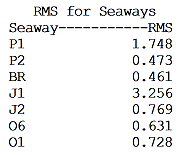
In this case, we also write the response statistics from each wave condition to a data file using /DATA:ST. We can then parse this data using the SK.LIB macro library (found here), and make a custom table of the RMS heave response for our vessel in each seaway: |
|
|
Anytime you are repeatedly modifying WAVE, there is no need to wait on additional solves--SEAKEEPING DATA will speed up the process.
A complete run file for this example can be found here. |
|
Questions, comments, or requests?
Contact Creative Systems, Inc. USA phone: 360-385-6212 Fax: 360-385-6213 Office hours: 7:00 am - 4:00 pm Pacific Time, Monday - Friday Mailing address: PO Box 1910 Port Townsend, WA 98368 USA Click here for an index to this and previous COWs |