
|
|
General HydroStatics
Ship Stability Software |
|
Command of the Week
(New or interesting aspects of GHS that you may not know about) |
|
HMMT WIND /PANEL
(Requires GHS version 18.78 or later with CG) |
|
Calculating heeling moments due to wind can be difficult when you want to consider shielding: namely the "blocking" effect upwind parts can have on downwind parts. While the fluid dynamics that govern shielding are quite complex, the latest version of GHS offers an entirely new method to include shielding when computing wind heeling moments.
HMMT WIND /PANEL is a fully-3D approach to wind moments. The method utilizes the surface panels which are created using the SURFACE statement in Part Maker. For example, if we want to add surfaces to a geometry file, we can put the following in a run file. |
|
enter pm
read rig.gf surface (hull) write rig.gf1 qu `pm |
|
Once we have surfaces, we can use them in our wind calculations. Invoking the new wind method is as simple as including the new /PANEL parameter on the HMMT WIND command: |
|
`...read geometry and establish loading condition
axis 0 wind 70 hmmt wind /panel so di status wind |
|
A keen eye will also notice that we've added a new WIND view to Condition Graphics. Issuing a DI STATUS WIND command after using HMMT WIND /PANEL will bring up a 3D surface view of the model and waterplane condition, and it will highlight surfaces depending on whether they are active (red) or shielded (blue) in the wind calculation. |

|
|
You will notice that there is no shielding in the view above, i.e. all windward surfaces are red. To control shielding, /PANEL has an optional subparameter which is the shielding distance. This is the distance within which downwind panels will be shielded by upwind panels. Think of it like driving behind a truck on the highway: if you get close to the truck you will be "shielded" by the truck, but the farther back you are the less you are shielded, until eventually the truck has almost no effect on you. When you set the shielding distance, you are specifying the distance within which shielding will occur.
If a shielding distance is not specified, as in the above example, the distance will default to zero and no shielding will take place. The keyword FULL can be used to specify complete shielding: |
|
wind 70
hmmt wind /panel:full so di status wind |
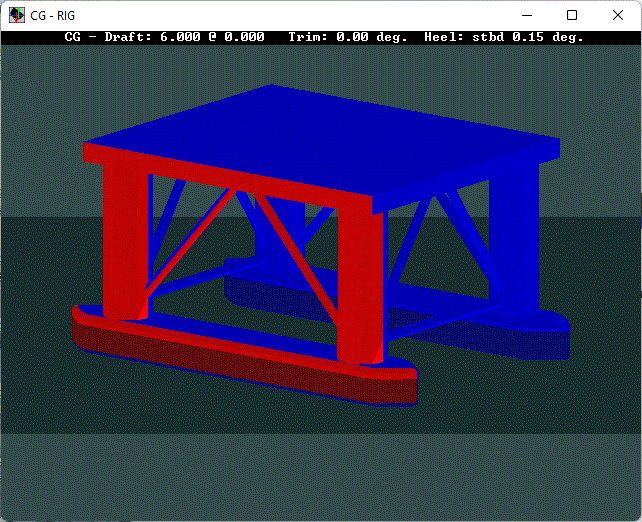
|
|
We can also specify a distance. Say we want to shield panels that are within 15 meters of an upwind panel, but omit shielding on panels that are farther apart:
|
|
wind 70
hmmt wind /panel:15 so di status wind |
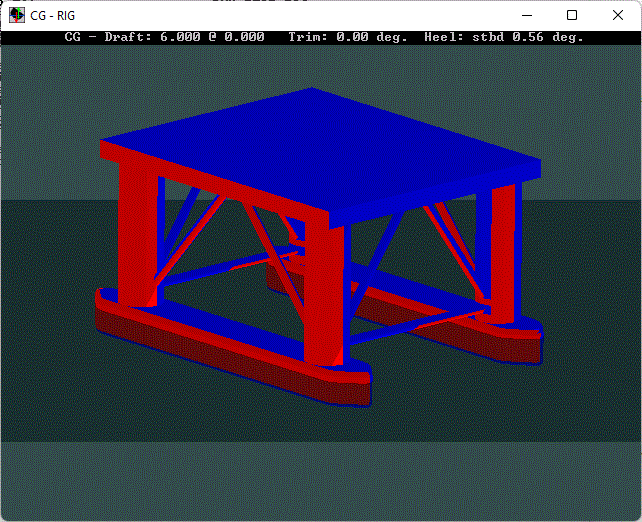
|
| If you would like to learn more about how HMMT WIND /PANEL works, you can find a bulletin here. |
|
Questions, comments, or requests?
Contact Creative Systems, Inc. USA phone: 360-385-6212 Fax: 360-385-6213 Office hours: 7:00 am - 4:00 pm Pacific Time, Monday - Friday Mailing address: PO Box 1910 Port Townsend, WA 98368 USA Click here for an index to this and previous COWs |