
|
|
General HydroStatics
Ship Stability Software |
|
Command of the Week
(New or interesting aspects of GHS that you may not know about) |
|
Ballast Advisor (update)
|
|
The Ballast Advisor is a wizard that helps determine the tank loads needed to achieve a desired waterplane. It is a good idea to set up an initial loading condition before starting the wizard. To run the wizard, type RUN BALLAST.WIZCO, or select BALLAST from the Wizard\Conditions menu in GHS.
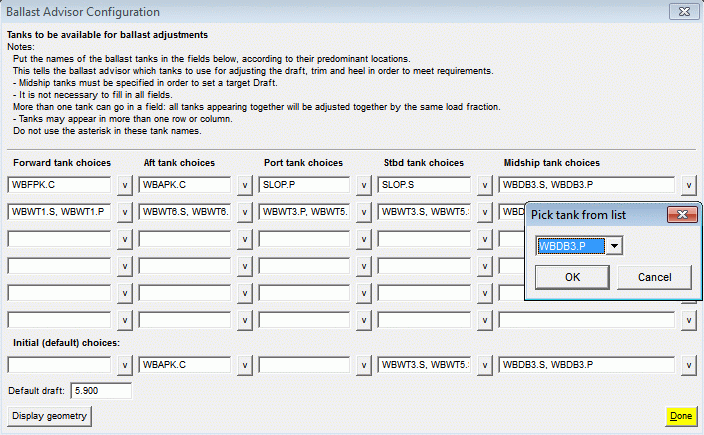
Before you can solve for the desired tank loads, the first step is to provide information related to the layout and function of the tanks on board the vessel. |
|
|
Once the tank configuration is set up, you won't need to enter that information again, but you can change it at any time if you realize later that you need a different grouping of tanks.
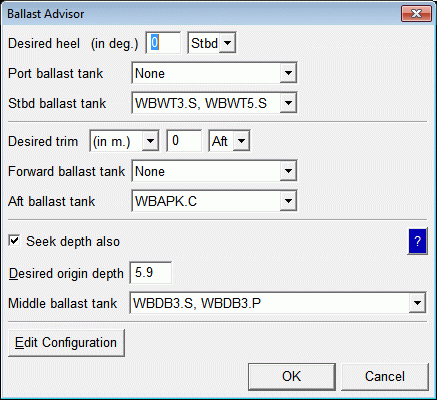
To make use of the Ballast Advisor, you need to enter the desired trim, heel, depth, or any combination thereof. In the example below, we are looking for the tank loads that result in zero heel and trim with an origin depth of 5.9. |
|
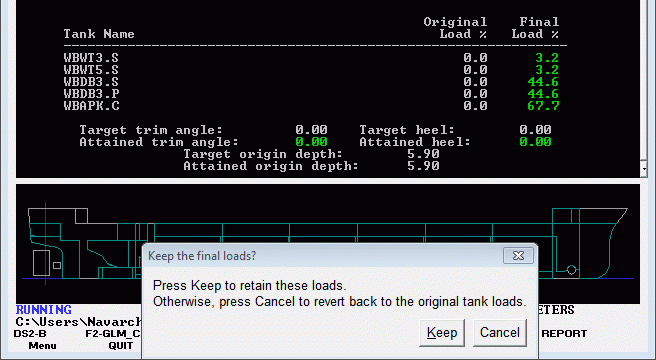
| The wizard quickly returns a set of suggested loads and reports whether the targets were achieved. The user can then accept these load changes or start again, perhaps with different groups of tanks. |
|
| Since this might be part of a larger task to work up a series of load conditions, here is a convenient way to access the Ballast Wizard from within Load Editor with Windows (LEw): |
|
macro ballast
run ballast.wizco / ... load (*) edit /auto /macro:ballast |

|
| When you need a ballast plan in hurry, use the Ballast Advisor! |
|
Questions, comments, or requests?
Contact Creative Systems, Inc. USA phone: 360-385-6212 Fax: 360-385-6213 Office hours: 7:00 am - 4:00 pm Pacific Time, Monday - Friday Mailing address: PO Box 1910 Port Townsend, WA 98368 USA Click here for an index to this and previous COWs |