
|
|
|
General HydroStatics
Ship Stability Software |
|
Command of the Week
(New or interesting aspects of GHS that you may not know about) |
|
VARIABLE /COLOR
|
| GHS is on its way to becoming a colorful program: even variables have colors. Variable definitions can include the /COLOR parameter. For example, |

|
|
Showing in the upper input field of the dialog box above is the contents of a variable to which the color number 4
has been applied. This method of showing colors in templates has the advantage of being able to
change the color of text without having to regenerate the dialog box. (If there
is no need to change the color, the /color parameter can be attached directly to the input
field in the template.)
In case you're curious, here's the code for this example: |
template c "Color demo" /size:large
  s
  break
  "New color number:_" c /dec:0 /start /apply:color
  exit
 /
macro color
  variable (str) s="The color assigned to this is {c}" /color:{c}
  \{s}\
  /
variable c:1:14=1
.color
end c
|
|
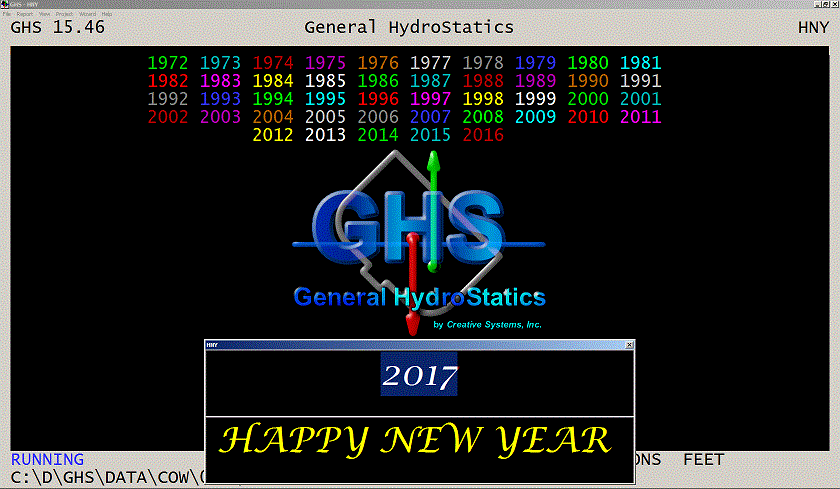
Variables in NOTE commands also show their colors on the screen -- as can
be seen in the above example where \{S}\ places the contents of the variable S
on the screen, centered on the line.
In the screen shot below, colors were rotated among the ten variables in a single NOTE command. These numbers happen to be the years Creative Systems has been in business, which makes the well-known micro-software giant our little sister! |
|
|
It must be admitted that there is an alternate way of showing colors in NOTE commands
using the {c} notation (as described in the manual), which is easier
in most cases.
We are talking about the screen here. In reports, the color settings on variables in NOTE commands have no effect except 4 and 12 (reds) which make the text appear as the bold version of the typeface. Colors in reports is another subject, familiar to many as the colorful effects you get via REPORT ... /BOX:COLOR are well known. Little known is the means by which colored text from NOTE commands can appear in reports. More on that later, or check the updated documentation coming out in 2017 with version 15.50. |
|
Questions, comments, or requests?
Contact Creative Systems, Inc. USA phone: 360-385-6212 Fax: 360-385-6213 Office hours: 7:00 am - 4:00 pm Pacific Time, Monday - Friday Mailing address: PO Box 1910 Port Townsend, WA 98368 USA Click here for an index to this and previous COWs |